
How To Download and Install the Raven Toolbar for Firefox
We are big fans of RavenTools.com and love the tool set they provide.
They have a great online suite of applications that make organizing and managing SEO campaigns a breeze, especially multiple campaigns. Not to mention the tool set is agency friendly with full user and permission control.
Raven Tools Firefox tool bar has become a “must-have” component in our browser (I am still waiting for the Chrome version…).
The raventools toolbar makes it very easy to interact with your web properties and perform many of the more tedious SEO tasks (such as tracking links in your link building campaigns) or quickly accessing differnt personas for your different websites.
However with the recent new updates to Firefox (versions 4, 5 & 6 coming out very recently) and the fact that I have to maintain a browser across at least 4 different computers (My main office PC, conference room PC, Laptop & home PC) I have had to do many updates recently. And each time I update, I would always do a google search for the raventools toolbar or raven toolbar for firefox or maybe even raventools firefox toolbar. However, my search never turns up relevant results.
I eventually found the answer I needed in the raventools knowledge base:
Unfortunately, I was not able to easily find this (through google at least) unless I actually searched the Raven Tools knowledge base.
And the biggest thing that I needed was to know how to actually download the RavenTools Firefox Toolbar.
Well the first part of their post showed where and how to download it.
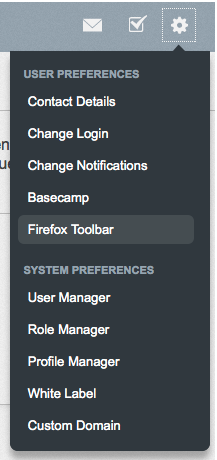
You have to be logged into your RavenTools account and then in the settings dropdown menu there is a link to install the toolbar.
Go to Main Settings > Firefox Toolbar.
Click on the “Download and Install” link and follow instructions.
I then realized that I should make my own post on my blog so I can easily find this information the next time I have to upgrade my browser again. Hopefully that won’t be next month again.
Update: I actually started writing this post at the end of June 2011. It was not completed and saved as draft and within that time frame, Firefox has updated to version 6. I installed the Raventoolbar and about a week later another security update was launched to version 6.0.1 and I had to wait until the upgrade was pushed out from Raven before I could use it again.
I am very thankful that Raven Tools is on top of this as they are fairly quick to get their updates out.
Categorized in: SEO - Search Engine Optimization
Published On: Sep 4, 2011